
One-time
Complete a purchase.
Create a one-time payment link for an individual transaction.
PaymentOS / Pay-by-Link
Your customer doesn’t need to be at the counter to take the next step.
Send a RewardlyPay payment link directly to your customer and track the transaction with real-time updates.
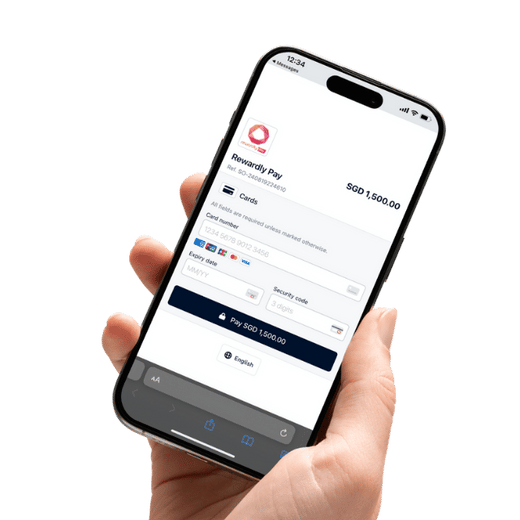 View checkout
A clear handover
Make each step easy for the customer to recognise and your team to follow.
Explain what the payment covers, the amount due and the purchase reference before sharing the link.
The customer opens the checkout, checks the details and uses an available payment option.
Match the successful payment in the merchant system to the purchase before releasing goods or services.
Recommended operating workflow. A sent link, opened checkout or customer screenshot is not proof of completed payment.
One purchase or an ongoing arrangement
Agree the payment terms and customer authorisation before configuring a repeated-payment arrangement. Confirm link validity, reuse rules and available settings for your setup.
Make the request recognisable
Suggested team wording—not a live payment link or an automated message template. Adapt it to the purchase and your fulfilment policy.
Keep payment-card details out of messages. Direct customers to the checkout, and make it easy to contact your team if anything looks unfamiliar.
More than collection
Rewardly Pay-by-Link can connect successful payments with automated customer rewards.
Decide what you want the customer to experience after paying. Is the next step a welcome benefit, a reason to return, or an invitation to explore your membership programme?
Confirm programme eligibility and the reward rules before launch.
Explore GoShanon ↗Explore credit top-up automation and one-click checkout, subject to setup and integration requirements.

Prepare your first payment journey
Bring a real purchase scenario to your RewardlyPay walkthrough.
Define the amount, purchase reference, recipient and delivery channel. Decide how your team handles an outdated or incorrect request.
Confirm enabled methods, fees, settlement timing, refunds and disputes. Do not assume terminal rates apply to payment links.
Agree who checks the status, reconciles the payment and tells the customer what happens next.
From conversation to checkout
See how payment links fit your sales and customer-service workflow.
Good questions
Check the payment status in the merchant system and match the amount and reference to the purchase. Do not rely only on a customer screenshot or the fact that a link was opened.
Ask RewardlyPay to confirm the methods enabled for your account and provide a payment-link quote. Include settlement timing, refunds and dispute charges in that discussion.
Discuss your intended channel and sending workflow during setup. Do not assume a native messaging integration or automated delivery is included for every channel.
Confirm the controls available for the type of link you need. Agree a process for an incorrect amount, a changed order or a request that should no longer be paid.
Do not treat opening a link as consent to recurring payments. Explain the arrangement and obtain the required customer authorisation through the approved setup workflow.
Confirm the loyalty programme, qualifying payments, customer identification and integration scope. Do not promise a reward until those rules are agreed and configured.