At 7 p.m. on a Friday, a party of four is running late, a walk-in is waiting and the host needs to know which table will free up next. A full-service restaurant needs a reservation system that carries the booking into the dining room. TableReady is Rewardly’s reservation and table management tool. It gives guests a direct booking page and helps your team carry the reservation through arrival, seating and the bill.
Put the booking on the same floor plan your team uses
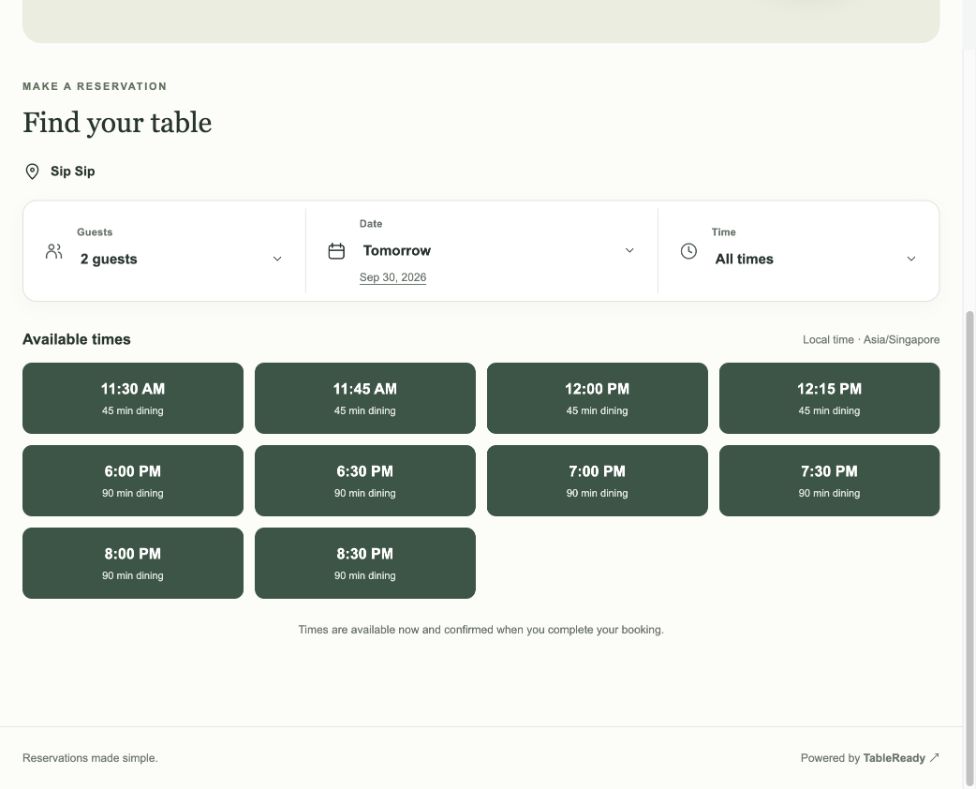
Start with one outlet. Connect TableReady to Rewardly and import the existing POS tables and sections instead of rebuilding the layout by hand. Review the imported floor plan, then set dining windows, party sizes and capacity for each service. Guests choose an available time and can share a dietary request. Confirmation emails, a reservation calendar and a digital walk-in waitlist help the host prepare before the room fills.
At a connected Full Service outlet, Rewardly POS shows incoming reservations on the floor plan. Staff can mark a party as arrived, seat it, record a delay, move the booking or cancel it. Rewardly documents that those actions go back to the reservation system and that paying the seated party’s bill completes the booking. Ask to see both screens update during your walkthrough. Confirm the outlet connection, staff permissions and what the host should do if a change is waiting to sync.
Carry the guest relationship through the meal
A returning guest should spend the evening with their friends, not repeating details to each staff member. The Rewardly connector can bring member records into TableReady’s guest directory. At the table, staff can use LoyaltyOS to check eligibility and apply the configured benefit. For example, test whether a member’s dining voucher applies to a set menu, and agree who explains the rule before the bill arrives.
Give guests a consistent experience from your branded Rewardly eCommerce site to the TableReady booking page. Link from the menu to reservations and use the same restaurant name and visuals. TableReady’s website editor can publish selected items from a connected Rewardly catalogue and link to Rewardly membership. If you sell a set menu in advance, ask to see how a pre-order is linked to the booking, reaches the kitchen and appears on the bill. For GoShanon referral rewards, confirm which campaign, qualifying payment and attribution are available for your outlet.
Treat booking payment and the final bill as two checkpoints. Where Adyen reservation payments are configured, TableReady can collect payment before confirmation. At service, close the bill in Rewardly POS with your configured PaymentOS method. Rehearse a booking change or cancellation with a prepayment and check who reconciles or refunds it.
Make your restaurant easier to find and book
Publish an outlet page with its opening hours, location, menu, booking rules and a visible reservation link. Use the same information on your Google Business Profile and add a booking link where available. TableReady’s published website pages support searchable text, page metadata and structured information about the restaurant. Clear answers help guests and give search and answer engines content they can understand. Placement varies by query and platform.
Compare TableReady, inline and SevenRooms
Start by deciding how you want guests to find you and how your host will run service. A booking marketplace helps diners discover a restaurant. A restaurant booking system helps staff manage availability, seating and changes. Some providers offer both. In each demo, ask the vendor to show a direct website booking and a booking from any external channel you use. Move both bookings and check where the host sees the change and which charges apply to each channel.
inline offers booking and queue management, plus takeout and delivery tools. Ask which integrations and booking channels are available in Singapore and how they pass guest and table information to your POS.
SevenRooms offers branded direct booking, waitlists, a guest CRM and reservation upsells. It advertises commission-free bookings on supported channels. Confirm the channels, POS connection and commercial terms for your outlet.
TableReady is a good fit to evaluate when your restaurant uses or plans to use Rewardly POS and LoyaltyOS. The native connection gives the team a way to reuse tables and member records. Rewardly Ultimate starts at S$259 per month and includes TableReady. Ask for the cost of upgrading your current plan and for written confirmation of any per-reservation or per-seat software surcharge. Compare payment processing, setup and outlet licences separately.
Rehearse a booking change before a limited-seat dinner
Separate venues and limited seatings give guests more choices and staff more details to check. Hilton’s 10 November 2026 announcement opened reservations for four NoMad Singapore dining venues. In an earlier release on 27 October 2026, the Singapore Tourism Board described a limited-seat dining series that starts with a two-night dinner in November. Neither example establishes a particular booking workflow for your restaurant. Practise the details your guests will depend on, from choosing the right venue to seeing what they still owe.
Imagine your restaurant offers a set dinner that guests can book in advance. One party asks to change the time and bring an extra guest. Have the host open the original booking number, check room in the requested seating and confirm the new headcount with the kitchen before promising the change. Show the party the updated venue, time and guest count. If you operate several venues, test each link with its own hours, dining window and capacity before sharing it.

At a connected Full Service outlet, check the same booking on the CommerceOS floor plan after the host saves the change. Seat the group and confirm the dining order. If a guest wants to redeem a LoyaltyOS voucher, check the selected menu and outlet before applying it. Explain the revised bill before taking payment, especially if the guest already paid part of the booking.
In the walkthrough, compare the updated booking, the original payment confirmation and the final PaymentOS receipt. Ask who checks whether the prepayment offsets the bill for this setup, and where a refund would be recorded if one is due. The booking change alone does not tell staff what happened to the money. Keep the booking number with the payment reference and practise that handover with the manager who closes the shift.
Train the team on one Friday-night scenario
Use AInstein for Rewardly setup and staff how-to questions. Inside TableReady, authorized staff can use its Concierge to look up a guest or booking, then review and submit supported changes such as a new time or party size. Let the booking rules and confirmations handle routine work. Give the host responsibility for exceptions, including late arrivals and refund decisions.
Bring your floor plan, one loyalty offer and a paid booking scenario. Ask Rewardly to walk your team through the same booking, from the guest’s phone to the settled bill.