
F&B POS System Selection Guide for Singapore: How to Choose the Right POS System for Hawkers, Cafés & Restaurants (With Grants)
- EPOS Expert

- Dec 20, 2025
- 10 min read
TABLE CONTENT

Why a POS system matters more in Singapore than in most markets
What is a POS system (in modern terms)?
	Cloud POS vs on-premise POS
	Sub-Variants of POS Systems
		POS System for F&B Businesses
		POS System for Retail Businesses
		POS System for Service Businesses
		POS System for Grocery Stores
		POS System for Hardware Shops
		POS System for Workshops
	Why Choosing the Right POS Variant Matters
The 9 must-have capabilities of a Singapore-ready POS system
	Payments that match how Singapore pays
	Multi-channel ordering (counter + QR + kiosk)
	Kitchen Display System (KDS) for speed and accuracy
	Delivery platform integration (GrabFood / Foodpanda workflows)
	Menu management that supports promotions and scheduling
	Inventory and ingredient-level control
	Loyalty and CRM
	Accounting integration for month-end sanity
	Grant-readiness and vendor accountability
Segment-based buyer guide
	Hawkers
	Restaurant & Cafés
	Fast-food / QSR
Where Rewardly POS fits (and who it’s for)
Cost checklist: how POS system pricing “really” adds up
FAQ
The “top spot” decision framework (copy/paste checklist)
Book a demo
Singapore’s F&B scene operates on tight margins: rising labor costs, peak-hour pressure, delivery-platform complexity, and customers who expect fast, cashless checkout. In this environment, a POS system is no longer “just a cashier tool”—it’s the operating system for your stall or outlet.
This guide is built from what consistently appears on Singapore-focused POS search results (common topics: cloud POS vs on-premise, PayNow/SGQR acceptance, delivery integrations, inventory, KDS, and government grants) and expands it into a practical, decision-grade framework—so you can pick a POS system that fits your business today and still works when you grow.
Why a POS system matters more in Singapore than in most markets
Singapore operators face a concrete mix of pressures:
Digital payments are now mainstream across hawker centres and F&B, supported by national initiatives. IMDA’s Hawkers Go Digital encourages stallholders to adopt contactless payments via SGQR, which supports multiple payment schemes through a single label. Infocomm Media Development Authority
Government support reduces adoption friction. The Productivity Solutions Grant (PSG) supports SMEs adopting pre-scoped IT solutions (including POS systems) with up to 50% of eligible costs. Enterprise Singapore
Pre-approved solutions exist. IMDA maintains a directory of pre-approved ICM solutions, which are “ready, affordable, and proven” and may be eligible for PSG support.
If you’re choosing a POS system in Singapore, grants and compliance readiness aren’t “nice-to-haves”—they directly affect your ROI and payback period.
What is a POS system (in modern terms)?
A POS system includes hardware + software that lets you take orders, accept payments, issue receipts, track sales, and increasingly manage inventory and customer engagement. Modern POS systems also connect to delivery platforms, accounting tools, kitchen screens, and loyalty systems. This broader definition is consistent across POS explainers and buyer guides.

Cloud POS vs on-premise POS (what Singapore merchants should know)
Most Singapore F&B operators now shortlist cloud POS because it provides multi-outlet visibility, easier updates, and remote management, while on-premises solutions suit edge cases that require local-only control and dedicated IT support.
Practical takeaway: If you plan to expand beyond one outlet, add a QR ordering/kiosk feature, or integrate delivery and loyalty, a cloud POS typically reduces long-term operational overhead.
Sub-Variants of POS Systems
While the term POS system is often used generically, modern POS solutions are highly specialised by industry. Different business models require different workflows, data structures, and integrations. A POS system that works well for a café may be unsuitable for a hardware shop or a service-based business.
Understanding these sub-variants of POS systems is essential when selecting the right solution—not just based on price, but on long-term operational fit and scalability.
POS System for F&B Businesses
Food and Beverage (F&B) businesses are among the most demanding POS environments due to high transaction volumes, peak-hour pressure, menu complexity, and kitchen coordination.
A modern F&B POS system must support different service models, including:
Cafés & Quick-Service Restaurants (QSRs) - These businesses prioritise speed, simplicity, and throughput. POS systems for cafés and QSRs typically support:
Fast counter ordering
QR scan-to-order for dine-in
Self-ordering kiosks to reduce cashier workload
Kitchen Display Systems (KDS) to speed up preparation
Simple loyalty programs for repeat visits
Food Kiosks & Hawker Stalls - Space is limited and manpower is constrained. POS systems here focus on:
Compact hardware footprint
Digital payments (QR, cards, wallets)
Queue number display for self-collection
Minimal setup and easy daily operations
Full-Service Restaurants - These require more sophisticated workflows:
Table management and split bills
Course sequencing (fire/hold)
Multi-station kitchens
Advanced reporting by outlet, shift, and server
Reservation and dine-in experience coordination
A strong F&B POS system goes beyond payment—it becomes the operating backbone connecting orders, kitchen, fulfilment, inventory, and customer experience.
POS System for Retail Businesses
Retail POS systems are built around product catalog management, stock movement, and sales tracking, rather than food preparation.
Common retail segments include fashion, gifts, toys, and bookstores, each with their own needs:
Product variants (size, colour, edition)
Barcode scanning and label printing
Stock transfers between outlets
Promotions such as bundles, discounts, and seasonal sales
Integration with e-commerce platforms and marketplaces
A modern retail POS system typically includes:
Real-time inventory visibility
Supplier and purchase order tracking
Multi-outlet stock synchronisation
Customer purchase history and CRM
Sales analytics by category, brand, or SKU
For growing retailers, the POS system serves as the central layer for inventory and sales control across both physical and online channels.
POS System for Service Businesses
Service-based businesses do not sell physical products but time, expertise, and appointments. Their POS requirements are fundamentally different.
Examples include beauty salons, hair barbers, fitness studios, and education or lesson centres.
Key capabilities of a service POS system include:
Appointment booking and calendar management
Staff scheduling and commission tracking
Package and membership sales
Partial payments, deposits, and recurring billing
Customer profiles with visit and treatment history
Instead of inventory, service POS systems focus on:
Time utilisation
Customer retention
Upselling of packages or memberships
In this context, the POS system doubles as a customer relationship and scheduling platform, not just a payment tool.
POS System for Grocery Stores
Grocery stores operate in a high-SKU, high-volume environment, where speed and stock accuracy are critical.
A grocery POS system must handle:
Thousands of SKUs with barcode scanning
Frequent price changes and promotions
Weighted items (by weight or quantity)
Expiry date tracking
Supplier-driven replenishment
Advanced grocery POS systems support:
FIFO (First-In-First-Out) stock logic
Automatic low-stock alerts
Integration with accounting and procurement
Multi-lane checkout for peak hours
Because margins are often thin, grocery operators rely heavily on POS data for shrinkage control, demand forecasting, and pricing decisions.
POS System for Hardware Shops
Hardware stores—such as lighting suppliers, construction material shops, and paint retailers—sell complex products with technical attributes.
Their POS systems must support:
Large catalogs with specifications (size, wattage, material, colour)
Bulk pricing and trade discounts
Unit-based and project-based sales
Credit terms for contractors or trade customers
Purchase history tracking by customer or project
Unlike fashion retail, hardware POS systems often integrate with:
Quotation and invoicing workflows
Supplier price lists
B2B account management
For these businesses, the POS system functions as a sales, inventory, and account management platform.
POS System for Workshops
Workshops—such as automotive repair shops or maintenance services—combine service workflows with parts inventory, making them one of the most complex POS categories.
A workshop POS system typically supports:
Job card creation and tracking
Labour vs parts breakdown
Technician assignment and time tracking
Quotation approval before work begins
Post-service invoicing and payment
Additional features often include:
Vehicle or equipment service history
Warranty tracking
Customer reminders for repeat servicing
Here, the POS system is not just transactional—it is the operational command centre for the entire workshop lifecycle.
Why Choosing the Right POS Variant Matters
Selecting the wrong POS system—one not designed for your business type—often leads to:
Manual workarounds
Operational inefficiencies
Poor staff adoption
Higher long-term costs
A modern POS system should align with:
Your industry workflow
Your current scale
Your future growth plans
Understanding POS sub-variants ensures you invest in a system that supports your business model today and scales with you tomorrow.
The 9 must-have capabilities of a Singapore-ready POS system
1) Payments that match how Singapore pays
A Singapore-ready POS system should support card/contactless and QR-based flows commonly used locally (PayNow/SGQR and major wallets), and provide reliable settlement reporting.
For hawkers, IMDA’s Hawkers Go Digital highlights the adoption of SGQR, enabling stallholders to receive payments across multiple payment schemes via a single SGQR label. Infocomm Media Development Authority

What to check:
Support for local QR flows (SGQR/PayNow, where applicable)
Stable checkout under peak-hour load
Clear reconciliation reports (daily sales, payout, refund/void logs)
2) Multi-channel ordering (counter + QR + kiosk)
Singapore consumers increasingly expect scan-to-order and self-order experiences in cafés and quick-service outlets. A modern POS system should support:
Counter ordering
QR ordering (scan-to-order)
Self-order kiosk (optional but high leverage for manpower)

This is also a common differentiation in Singapore POS buyer guides and cloud POS positioning for F&B.
3) Kitchen Display System (KDS) for speed and accuracy
KDS reduces misreads and lost tickets and helps the kitchen prioritise. Many restaurant POS guides consistently flag KDS as a key workflow upgrade for busy outlets. TechRadar

What to check:
Can KDS split by station (grill/drinks/dessert)?
Can it show order age/timers and status (new/in progress/ready)?
Can it support takeaway vs dine-in vs delivery views?
4) Delivery platform integration (GrabFood / Foodpanda workflows)
Delivery orders are a significant operational load in Singapore. A POS system that centralises delivery orders and keeps menu availability aligned helps prevent cancellations and manual re-entry. Singapore POS content frequently highlights delivery integration as a selection criterion.
5) Menu management that supports promotions and scheduling
Operators often underestimate menu complexity until they run:
Combo menu
Seasonal sets
Limited-time items
Time-based pricing (happy hour)
Outlet-specific availability
Member-specific availability
Retail variant products
Item tax scheme
Age-control products
Law-regulated items
A POS system should support a structured menu engine to reduce human error and prevent “menu drift” across channels.
6) Inventory and ingredient-level control (for F&B margin protection)
If you’re running a kitchen, the next level after “inventory” is ingredient and recipe control—so menu availability can reflect real stock, and you can reduce wastage.
Even many POS explainers now frame inventory as a core modern POS function, not an add-on.
7) Loyalty and CRM (especially for cafés and brands with repeat demand)
A POS system becomes far more valuable when it helps you increase repeat visits. Many “all-in-one” POS platforms offer basic customer tracking, but a full loyalty suite usually includes:
targeted campaigns
voucher/store credit logic
referral tracking

For cafés and fast-casual brands, loyalty is often the difference between “busy sometimes” and “predictable daily sales”.
8) Accounting integration for month-end sanity
Singapore operators commonly use accounting platforms and need clean export and reconciliation workflows. Your POS system should support:
daily sales export (by payment method)
refund/void logs
outlet-level breakdown
tax treatment where relevant
9) Grant-readiness and vendor accountability
If you want to leverage PSG:
Check the IMDA pre-approved solutions directory (eligibility depends on solution listing and your business profile). Infocomm Media Development Authority
PSG offers up to 50% support for eligible costs for local SMEs under the current programme terms.
Segment-based buyer guide
A) Hawkers: most straightforward workflow, highest speed requirement, and flexible UI configuration
Your priorities:
compact setup, quick checkout
SGQR-compatible digital payments (often the first step)
stable operation under lunch rush
Larger font size improves order accuracy
IMDA’s Hawkers Go Digital program specifically supports hawkers in adopting contactless digital payments via SGQR.
Best-fit POS pattern: Payments + basic POS + simple reporting → then add QR ordering or queue workflow only if volume demands it.
B) Restaurant & Cafés: repeat customers + menu agility
Your priorities:
QR ordering for dine-in convenience
loyalty/membership to drive return visits
seasonal menu promotions and bundles
simple inventory for ingredients (milk, beans, syrups)
Best-fit POS pattern: POS + QR + loyalty + clean reporting → then add KDS if the kitchen line becomes a bottleneck.
C) Fast-food / QSR: throughput and fulfilment automation
Your priorities:
kiosk to reduce cashier load
KDS + expedite/ready-order handling
queue/display workflows for self-collection
stock-driven menu availability to prevent oversell
delivery integration without manual re-entry

Best-fit POS pattern: Unified ordering + KDS + fulfilment controls + inventory automation.
Where Rewardly POS fits (and who it’s for)
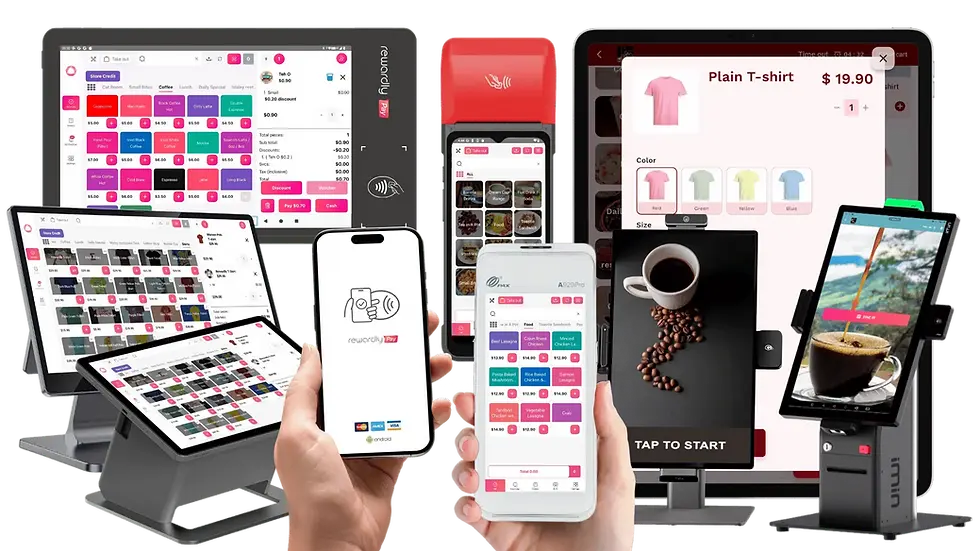
If you’re comparing “basic POS” vs “operations platform”, Rewardly POS is positioned as a Singapore-focused stack that emphasises unified commerce workflows (POS + QR ordering + kiosk) and operational modules like kitchen/fulfilment and automation. Rewardly publishes Singapore-centric POS content and positions its offering around the needs of modern F&B operations. Rewardly Loyalty POS system
When Rewardly is most relevant:
You want one platform to manage POS + QR + kiosk (instead of stitching tools together)
You need kitchen + fulfilment workflows (KDS, expedite, queue display)
You care about inventory/ingredient visibility and menu availability control
You plan to scale outlets and want a consistent menu and promo execution
(If you intend to claim eligibility under PSG/other grants for Rewardly specifically, verify the listing status in IMDA’s pre-approved directory first, as eligibility is programme- and listing-dependent.) Infocomm Media Development Authority+1
Cost checklist: how POS system pricing “really” adds up
A common pain point in Singapore is pricing that appears affordable at the outset but escalates with add-ons and device counts. When reviewing quotes, ask for a 3-year TCO view:
Base subscription (per outlet)
Additional terminals or devices
QR ordering module
KDS screens count
kiosk licensing
loyalty module
delivery integration
onboarding/training and support tiers
Skyscraper tip: don’t compare “monthly fee” only—compare the complete operating configuration you actually need.
Implementation plan (so you don’t lose a weekend to go-live)
A POS system rollout succeeds when you treat it like an operations project:
Menu + modifier structure (get this right first)
Payment methods + settlement testing (PayNow/QR/card flows)
Peak-hour simulation (lunch/dinner load)
Kitchen workflow mapping (KDS stations, status rules)
Staff training (opening, closing, refunds, voids, promos)
Soft launch (1–3 days) before entirely switching off the old flow
FAQ
What is the best POS system in Singapore?
The best POS system depends on your segment: hawkers prioritise speed and compact payments; cafés prioritise QR ordering and loyalty; fast-food prioritises kiosk, kitchen automation, and queue workflows. Use a feature checklist plus a 3-year TCO to compare options.
Can I get a government grant for a POS system in Singapore?
Many SMEs use the Productivity Solutions Grant (PSG), which supports the adoption of pre-scoped IT solutions and offers up to 50% of eligible costs, subject to eligibility criteria and approvals.
Should I choose cloud POS or on-premise POS?
Cloud POS is typically easier to scale and manage across outlets and integrates more smoothly with modern modules (QR ordering, delivery, reporting). On-premises is suitable for exceptional cases where you need local-only control and support for IT maintenance.
Do I need KDS for a small outlet?
If peak-hour errors or kitchen bottlenecks are common, KDS is one of the highest-ROI upgrades for improving speed and accuracy in restaurants and QSR workflows.
The “top spot” decision framework (copy/paste checklist)
Before you shortlist any POS system, score each vendor 1–5:
☐ Singapore-ready payment flows (QR + card + reconciliation)
☐ QR ordering and/or kiosk supported (if needed)
☐ Kitchen workflow: KDS + station routing
☐ Delivery platform workflow (if delivery-heavy)
☐ Menu scheduling + promotions management
☐ Inventory/ingredient control (for margin)
☐ Loyalty depth (if repeat business matters)
☐ Accounting export/integration readiness
☐ Grant-readiness / vendor accountability
☐ 3-year TCO clarity (no surprise add-ons)
If you want a unified stack that covers multiple channels and operational modules, Rewardly POS is a Singapore-focused option to add to your shortlist alongside other market options. Rewardly Loyalty POS system
Book a demo with us to learn more about the POS system


Comments